Mode 20 · PPE compliance
Helmet and vest detection in work areas
Mode 20 continuously checks whether people in a work area are wearing a hard hat and a high-visibility vest. ISEE-CAM sees up to 15 m with a 150° field of view. When someone is missing either item, it triggers an audible and visual alarm on site, sends an e-mail with a snapshot, and logs the event for PPE compliance reports.
- Helmet and vest up to 15 m
- 150° field of view
- Alarm, e-mail and reports

How the PPE detection camera checks helmets and vests
Most sites have the PPE rule written down and a sign on every door. The gap opens an hour into the shift: a helmet taken off on a hot loading platform, a vest left on a forklift, a visitor walking in with a question. Supervisors cannot watch every bay all day, and CCTV is usually reviewed only after an incident. Mode 20 checks every person in view, all shift, while they are still in the area.
01 · Zone
Work area in the camera's 150° view
02 · Trigger
Person without a hard hat or safety vest
03 · Outputs
- Siren and beacon on site
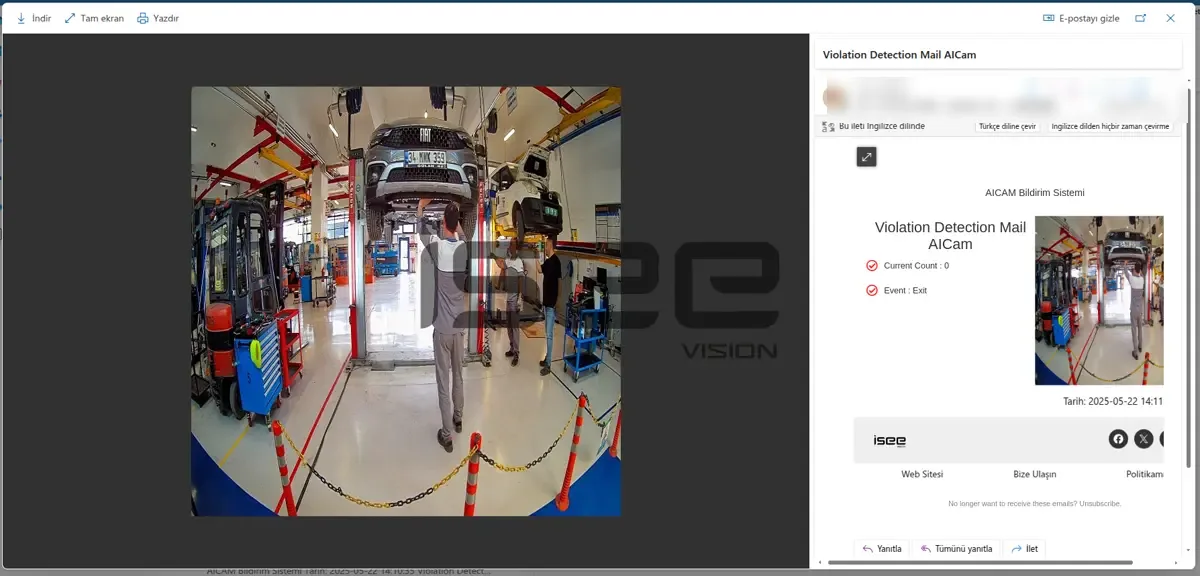
- E-mail with violation snapshot
- Daily, weekly, monthly report
Step 1
Check every person in view
ISEE-CAM's on-device model finds each person in the image and checks two items: a hard hat on the head and a high-visibility vest on the torso. It works up to 15 m from the camera across a 150° field of view, so wide areas need fewer cameras than with narrow lenses.
Step 2
Separate a violation from a passer-by
In the web interface you choose the area where the rule applies, for example the loading platform but not the office corridor next to it. Only people inside that area are checked, so staff walking past outside the PPE zone do not create false alarms.
Step 3
Alarm now, report later
A violation switches a dry-contact output for a siren or beacon within 100 ms, so the person hears it on the spot. At the same time an e-mail with a snapshot goes to the OHS team, and every event is counted in daily, weekly and monthly reports.
Field footage
No-helmet alert on a truck loading platform
Helmet check on a raised loading platform
The camera watches a raised platform beside a truck loaded with beverage pallets. Workers in vests and fall-arrest harnesses move along the platform and onto the load. When a worker is on the platform without a helmet, ISEE-CAM raises a no-helmet alert and switches on the beacon; the worker standing on the load with a white helmet does not trigger it.
Where continuous hard hat detection pays off
Loading platforms and docks
Workers climb onto trucks to secure loads, where a dropped item or a fall makes a helmet essential. A beverage plant uses Mode 20 on its loading platform with a beacon that lights up as soon as someone works bareheaded.
Vehicle service and assembly
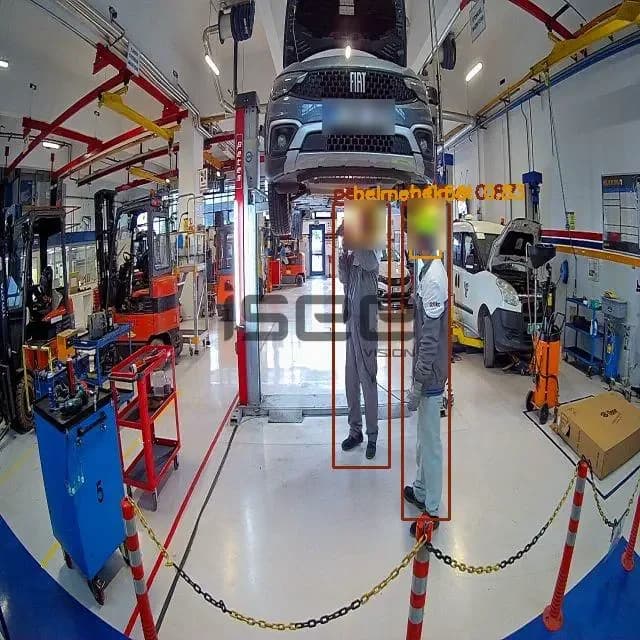
In automotive service bays, technicians work under raised vehicles. Cameras check helmets in the lift area, and the same setup feeds lift control and an audible warning, so the lift does not move while someone is exposed.
Production halls and warehouses
Forklift aisles, steel stock areas and crane bays where vests keep people visible to drivers and helmets protect against falling loads. One camera covers a wide aisle section from a pole or wall.
Tender-driven OHS programs
Many companies now write "AI-based PPE inspection system" into their technical specifications. Mode 20 provides on-device detection, local alarm outputs, e-mail notifications and reports, and we check it against your specification item by item.
Helmet and vest detection specifications
- Detection target
- Hard hat and high-visibility vest; site-specific PPE on request
- Range and view
- Up to 15 m, 150° field of view
- Alarms
- Audible and visual, via 3 dry-contact outputs
- Notifications
- E-mail with snapshot; daily, weekly and monthly reports
- Integration
- 1 input, 3 outputs; OPC-UA, Modbus TCP, REST API
- Processing
- On the device, no cloud; alert-to-output under 100 ms
- Camera
- 1920×1080, 25/30 fps, IP69K, −20 to +70 °C
Planning a PPE detection installation
- The camera must see the head and torso. In crowded areas, people behind each other or behind racks can be hidden, which affects the camera count.
- Camera count depends on the zone size, mounting height and obstructions. We size it from a photo or video of the area, or from a site survey.
- Mode 20 checks helmets and vests. Gloves, glasses, masks, harnesses or site-specific PPE need a custom model or Mode 21 at the entry.
- It raises alarms and records violations; it does not stop machines or lock doors. For a gate that blocks entry without PPE, use Mode 21.
PPE detection camera vs. supervisors, CCTV review and gate checks
Each method catches PPE gaps at a different moment.
| Method | Covers | Gap |
|---|---|---|
| Supervisor rounds | Corrects people on the spot, with context | Only where and when the supervisor is present |
| CCTV review | Shows what happened after an incident | Nobody watches live; no alarm at the moment |
| Gate or turnstile check | PPE at the moment of entry | Helmets removed later inside the area are missed |
| ISEE-CAM Mode 20 | Every person in view, all shift, with alarm and records | Needs a clear view of head and torso |
Questions & Answers
Frequently asked questions
How does PPE detection work without tags or sensors on the helmet?
It is purely visual. The model running on the camera recognizes a hard hat and a high-visibility vest on each person it sees, up to 15 m away. Workers do not need badges, chips or special helmets, and visitors or subcontractors are checked the same way as staff.
How many cameras do I need for my site?
It depends on the area size, the mounting height and what blocks the view. With a 150° field of view, one camera often covers a loading platform or a wide aisle section. Send us a photo or short video and we will propose the number and positions.
What happens when a worker takes their helmet off?
As soon as a person inside the defined area is seen without a helmet, the siren or beacon switches on, an e-mail with a snapshot goes out and the event is logged. The alarm is meant to correct the behavior on the spot, not only to record it.
Is footage sent to a cloud service?
No. All processing happens on the ISEE-CAM itself, and no server is needed. Only the alarm output, the e-mail with its snapshot and the report data leave the device, going to the recipients and systems you configure.
What is the difference between Mode 20 and Mode 21?
Mode 20 monitors a work area continuously and alarms when a helmet or vest is missing. Mode 21 sits at an entry point, checks a configurable PPE list and blocks passage until everything is worn. Many sites use Mode 21 at the door and Mode 20 inside.
Plan a tailored deployment
Send us a photo or a short video of the work area where helmets and vests are required, and tell us where a camera could be mounted. We will tell you how many cameras you need and where.