Mode 6 · Warehouse racking safety
Rack climbing detection for warehouse aisles
Mode 6 watches the face of your warehouse racks and detects anyone climbing them. When a person appears on the rack levels you mark as off-limits, ISEE-CAM sounds a siren, flashes a beacon or projects a warning, and e-mails a snapshot report. It covers people up to 25 m away and can also flag missing harnesses or helmets at height on request.
- Detects climbers up to 25 m
- Siren, beacon or projection
- E-mail report with snapshot
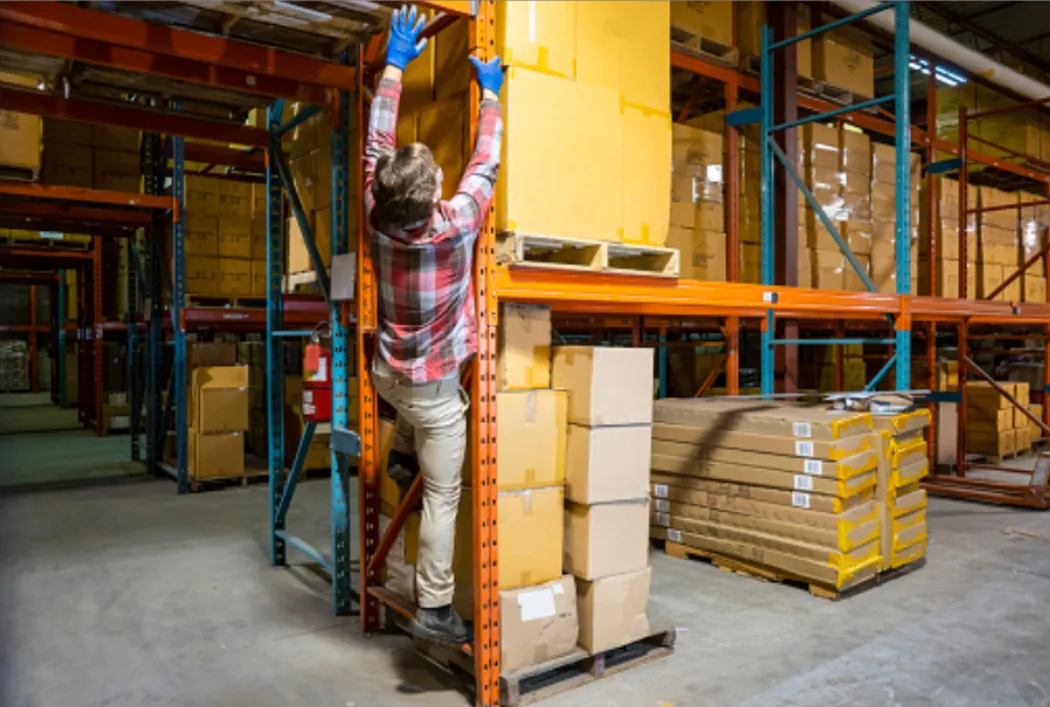
How rack climbing detection works in an aisle
Every warehouse rule book says the same thing: use a forklift, an order picker or a ladder, never the rack itself. Yet a single carton on the third beam level is a strong temptation when the truck is busy at the other end of the building. Climbing usually lasts seconds, so supervisors rarely see it and CCTV only shows it after a fall. Mode 6 turns the rule into an automatic check at the moment it is broken.
01 · Zone
Upper rack levels marked as no-climb
02 · Trigger
Person detected on the rack face above floor level
03 · Outputs
- Siren or beacon in the aisle
- Floor projection warning
- E-mail report with snapshot
Step 1
Watch the rack face, not the floor
ISEE-CAM is mounted at the end of an aisle or on a column facing the racking. In the web interface you draw the no-climb zone over the beam levels where nobody should stand, leaving the floor walkway outside it. People are detected up to 25 m away, so one camera can cover a long run of bays.
Step 2
Flag a climber, ignore the pickers
A person walking or picking at floor level stays outside the zone and causes no alert. As soon as someone's body is detected on the marked rack levels, the mode treats it as a climbing event. If the site needs it, a second rule can check harnesses and helmets for people working at height.
Step 3
Warn on the spot and keep a record
The dry-contact outputs drive a siren, a beacon or a projector that throws a warning onto the aisle floor, within 100 ms of the alert. Each event is saved with a snapshot, e-mailed to the OHS team and collected in daily, weekly and monthly reports that show which aisles and shifts need attention.
Where warehouse racking safety cameras are used
Distribution centers
Long aisles of selective pallet racking where pickers work at floor level and forklifts serve the upper beams. Mode 6 catches the shortcut of stepping onto the first beam to reach a carton when no truck is free.
Spare parts and MRO stores
Shelving and racking holding small, frequently picked parts. Staff often reach for items on upper shelves during urgent breakdowns; the camera reminds them to fetch a ladder or platform before an accident does.
Production buffer stores
Racks beside assembly or packaging lines holding raw material and semi-finished goods. Line operators are not warehouse staff and are more likely to climb; an audible alert in the aisle corrects the habit fast.
Areas where working at height is banned
Mezzanine edges, machine tops or tank platforms where the site has prohibited working at height without a permit. The same logic flags anyone detected in the marked elevated zone.
Rack climbing mode specifications
- Detection target
- People on rack levels inside the marked zone
- Detection range
- Up to 25 m from the camera
- Optional checks
- Harness and helmet at height, on request
- Outputs
- 1 input, 3 dry-contact outputs; OPC-UA, Modbus TCP, REST API
- Alerts
- Siren, beacon or projection; e-mail with snapshot
- Reporting
- Daily, weekly and monthly event reports
- Processing
- On the device, no cloud, no server
Before you mount a camera on a rack aisle
- A clear line of sight along the rack face; pallets, hanging signs or wrapped loads that hide the beam levels create blind spots.
- One camera per aisle face in most layouts; double-deep or very long runs may need a second camera, sized from a photo or video.
- If planned work at height happens in the aisle (order picker, MEWP, maintenance), use the camera's input to pause the rule during that work.
- Mode 6 detects and warns; it does not replace rack inspections, anti-collapse mesh, load signs or training on safe access.
Rack climbing camera vs. signs, patrols and CCTV
Most warehouses already use the first three; the difference is when the climb is noticed.
| Method | Covers | Gap |
|---|---|---|
| Signs and toolbox training | Sets the rule and explains the risk | Nothing happens when someone ignores it |
| Supervisor patrols | Corrects behavior when seen | A climb takes seconds; patrols see a fraction |
| CCTV recording review | Evidence after an incident | Watched later, if at all; no live warning |
| ISEE-CAM Mode 6 | Detects each climb and warns in the aisle | Needs a clear view of the rack face |
Questions & Answers
Frequently asked questions
How does the camera tell climbing from normal picking?
It uses the zone you draw. Picking happens at floor level, outside the zone. Climbing puts the person's body on the beam levels inside it, which triggers the alert. Drawing the zone just above head height keeps everyday picking quiet while catching anyone who steps onto the rack.
Will a reach truck or order picker set off the alarm?
The mode looks for people, and an operator lifted by a man-up truck can appear on the upper levels. Where that work is routine, the camera's input can pause the rule while the truck is in the aisle, or the zone can be drawn around the bays it serves. We plan this in the pre-study.
Can it also check harnesses and helmets at height?
Yes, on request. For sites where working at height is allowed with PPE, the mode can check harness and helmet use on people in the elevated zone and report violations through its outputs, instead of treating every person there as a climber.
What happens after an alert?
The aisle siren, beacon or floor projection warns the person straight away. At the same time a snapshot goes to the OHS team by e-mail, and the event is added to the reports. Over a few weeks, the reports show which aisles and shifts need training or better access equipment.
How many cameras does a warehouse need?
It depends on aisle length, rack height and what blocks the view. One camera usually covers one rack face along an aisle, up to 25 m. Send us a floor plan and a photo from the aisle end and we will size it.
Plan a tailored deployment
Send us a photo taken from the end of a typical aisle, the rack height and a floor plan. We will propose camera positions, no-climb zones and the alert setup.