Mode 1 · Bird's-eye detection
Overhead personnel detection from above
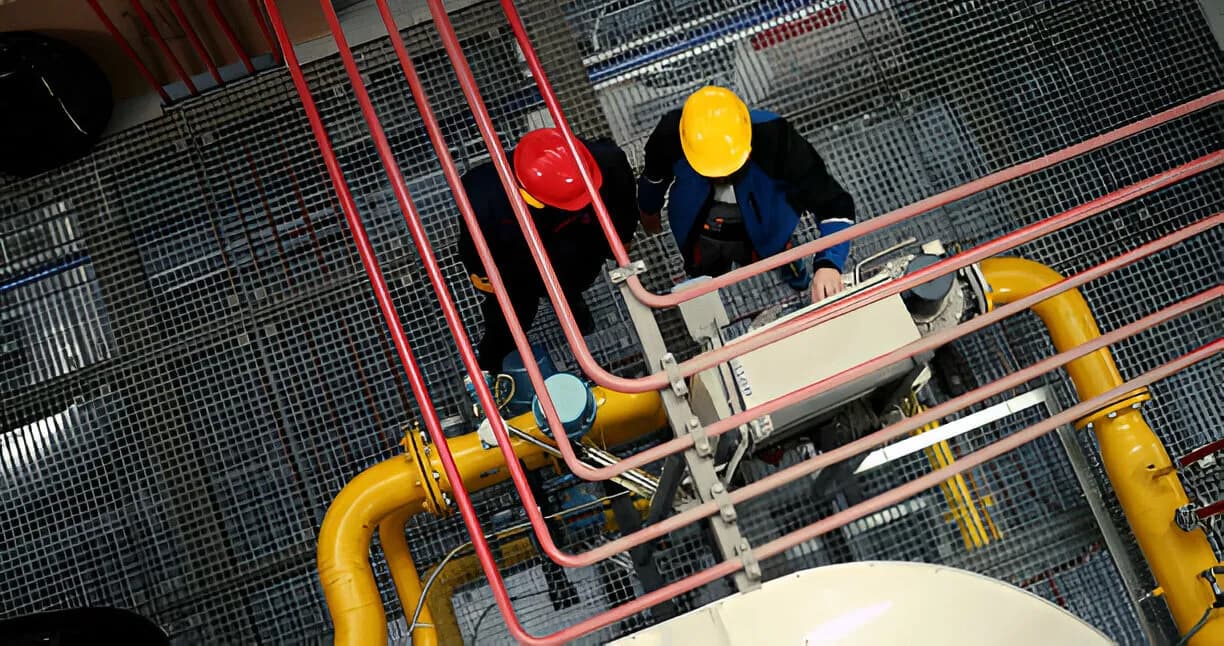
Mode 1 mounts ISEE-CAM above the hazard, up to 10 m high, looking straight down. From that bird's-eye view it detects people inside the zones you draw, even where stacked material, tall machines or bunker walls hide them from a side camera. A detection switches a siren, beacon or PLC signal within 100 ms, 24/7.
- Bird's-eye view up to 10 m high
- Sees past stacks and walls
- Siren, beacon or PLC signal
Why a top-down camera finds people a side view misses
A side-mounted camera only sees what is in front of the first obstacle. In scrap yards, bunker floors, coil stores and crowded machine halls, a person can stand two meters behind a pile or a machine frame and be invisible from the wall. People also hide each other when several walk together. Looking down from above removes most of those blind spots. Mode 1 is built for that viewpoint, so the zone on the floor is checked from the one angle nothing can block.
01 · Zone
Floor area seen from directly above
02 · Trigger
Person detected inside the drawn zone
03 · Outputs
- Siren or beacon at the zone
- Signal to PLC or equipment
- E-mail alert and daily report
Step 1
Mount above the hazard
ISEE-CAM is fixed to a roof beam, a gantry, a platform or another structure up to 10 m above the floor and aimed straight down. From there the whole zone is in view at once, including the gaps between piles, machines and walls that a wall camera cannot see.
Step 2
Recognize people from the top
The on-device model is trained to recognize people seen from above, where only the head, shoulders and arms are visible. It works without tags or badges and keeps people apart when they walk close together. You draw one or more zones on the overhead image in the web interface.
Step 3
Signal before work continues
When a person is inside a zone, the dry-contact outputs switch in under 100 ms: a siren for the person, a beacon for the operator, a signal to the PLC. With the trigger input, the check can run only while a loader, conveyor or discharge cycle is active.
Field footage
Bird's-eye detection over a scrap yard
Top-down view over a scrap pile
In this clip ISEE-CAM is mounted high on a crane at a scrap yard and looks straight down at the pile and the lanes around it. Workers walking between scrap heaps and trucks are marked with a box as they enter the zone, even when they are partly hidden by material. A side camera at ground level would lose them behind the piles.
Where overhead person detection is the better mount
Cement and bulk materials
Bunker floors, hopper openings and silo tops, as in a cement plant's bunker and silo areas. A camera above the opening checks that nobody is near it before material is discharged or a feeder starts.
Scrap and recycling
Yards where loaders, grabs and trucks work among high scrap piles. A top-down camera follows people walking between heaps, which no fixed side view can do once piles grow.
Steel stock areas
Coil, billet and plate stores where stacks are taller than a person. An overhead camera watches the aisles between stacks so a worker is found before a load is moved into the aisle.
Dense machine halls
Areas packed with tall machinery and frames where a wall camera would only see the first machine. Mounting above the cell gives a clear view of the floor between them.
Overhead detection specifications
- Detection target
- People seen from above (no tag or badge needed)
- Mounting height
- Up to 10 m, looking straight down
- Zones
- Multiple zones on the overhead image, drawn in the web interface
- Inputs and outputs
- 1 trigger input, 3 dry-contact outputs; OPC-UA, Modbus TCP, REST API
- Response
- Alert-to-output latency under 100 ms, on-device processing
- Housing
- IP69K, −20 to +70 °C, ISO 16750-3 vibration rated, 500 g
Mounting height and site checks for a top-down camera
- A rigid mounting point above the zone, no higher than 10 m, with a straight downward view and access for cabling.
- Enough light on the floor for a person to stand out on the image; dark bunkers and night shifts may need extra lighting.
- Heavy dust, steam or spray directly under the camera reduces visibility; keep the lens out of direct material flow.
- ISEE-CAM adds a detection layer to the equipment's own safety devices and procedures. Any stop signal is wired by a qualified electrician into the existing safety circuit.
Overhead camera vs. side camera, mirrors and spotters
The question is not whether to watch the zone but from which angle; this is what each option leaves out.
| Method | Covers | Gap |
|---|---|---|
| Side-mounted camera (Mode 0) | Long open areas up to 25 m | Loses people behind stacks, walls and machines |
| Convex mirrors | Lets the operator glance around a corner | Small image, no alarm, depends on attention |
| Human spotter | Watches the area and warns by voice or radio | One viewpoint, fatigue, costly every shift |
| ISEE-CAM Mode 1 | Top-down view of the floor from up to 10 m | Needs a mounting point above; covers a smaller footprint than a 25 m side view |
Questions & Answers
Frequently asked questions
When should I choose an overhead mount instead of a wall mount?
Choose Mode 1 when objects in the area are taller than a person or move around: scrap piles, coil stacks, bunker walls, dense machinery. If the area is open and flat, a wall mount with Mode 0 covers more ground, up to 25 m.
How high can the camera be mounted?
Up to 10 m above the floor for person detection from above. The area covered on the floor grows with height, so the right height depends on the zone size. We size it from a photo or video of the area, or from a site survey.
Can the model recognize a person from directly above?
Yes. Mode 1 uses a model trained on top-down images, where a person appears as head, shoulders and arms rather than a full body. It detects people with or without a hard hat; if you need to count helmeted and non-helmeted people, use Mode 3.
Can the overhead camera be fixed to a crane?
Yes, as in the scrap yard clip. If the camera rides on a crane and you need warning and alarm zones that stop the crane, Mode 12 is the dedicated crane mode. Mode 1 suits fixed zones such as bunkers, aisles and machine cells.
Does it work in dusty cement and scrap environments?
The IP69K housing is sealed against dust and water jets and rated from −20 to +70 °C. What limits detection is visibility: if dust or steam hides people from a human eye, it also hides them from the camera. Position the lens outside the main dust plume.
Plan a tailored deployment
Send us a photo from above the area, or a sketch with the available mounting height. We will tell you whether one overhead camera is enough and where to place it.