Mode 10 · Forklift dwell time
Forklift waiting time and idle parking alerts
Mode 10 measures how long a forklift stays in a zone you define and raises an output once it passes your time limit. It is used to catch trucks parked in fire lanes or aisles, waiting too long at a dock or line-side point, or left idle where they block traffic. No hardware on the forklift is needed.
- Times forklifts up to 20 m away
- Your own limit per zone
- No hardware on the truck
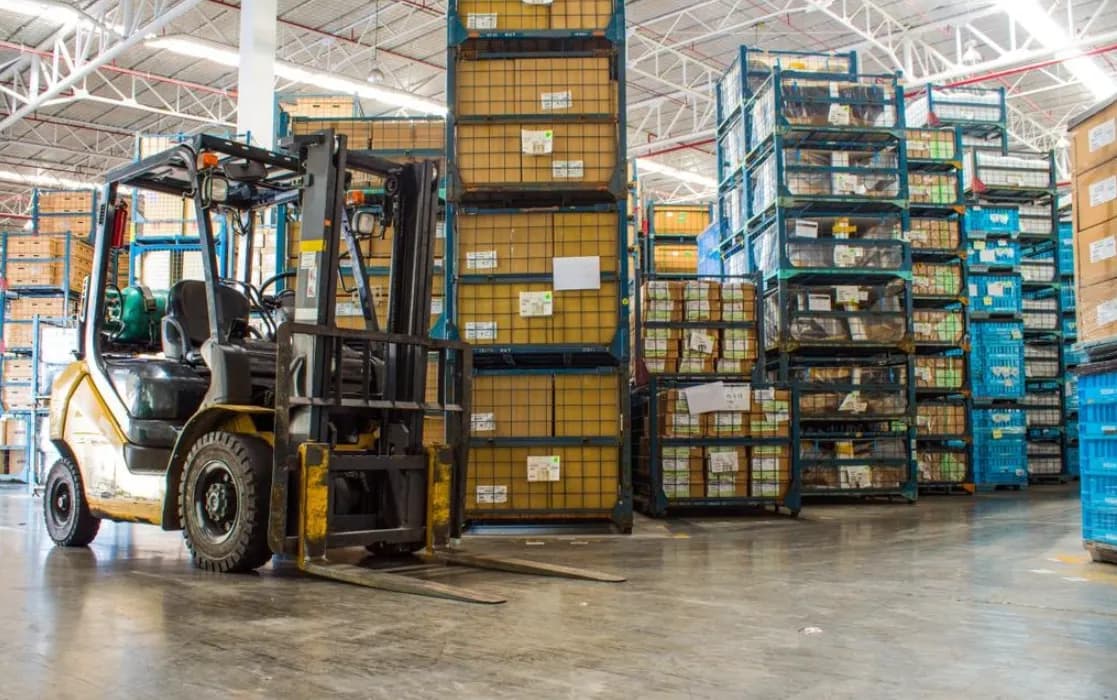
How forklift idle time is measured in a zone
A forklift standing still is not dangerous in itself. It becomes a problem when it stands in the wrong place for too long: in front of a fire exit, across an aisle that pedestrians must now walk around, at a dock door holding up the next truck. Supervisors notice some of these cases on their rounds and miss the rest. Mode 10 times each stop inside the zones that matter and reports only the ones that break your rule.
01 · Zone
Fire lane, aisle, dock or line-side point
02 · Trigger
Forklift stays longer than the set time
03 · Outputs
- Beacon or signal at the zone
- E-mail to shift supervisor
- Event in daily/weekly/monthly report
Step 1
Spot the forklift in the zone
ISEE-CAM detects forklifts up to 20 m from the camera with its on-device model. As soon as a truck is inside one of the zones you drew in the web interface, the camera starts counting how long it stays there.
Step 2
Compare with your time limit
You set the threshold in the interface: a short one for a fire lane or emergency exit, a longer one for a dock door where some waiting is normal. Brief stops below the limit are ignored, so normal handling does not create alarms.
Step 3
Raise an output and keep a record
When a forklift goes over the limit, ISEE-CAM switches a dry-contact output to drive a beacon or signal your PLC, and can send an e-mail. Events are collected in daily, weekly and monthly reports, which shows where trucks wait most often.
Where forklift waiting time limits make sense
Fire lanes and emergency exits
Forklifts parked for "just a minute" in front of exits, hydrants or fire hose cabinets are a classic audit finding. A short threshold on these zones alerts the area supervisor before the truck turns into a blocked escape route.
Main aisles and crossings
A truck left in a main aisle forces pedestrians into the forklift lane and stops other traffic. Mode 10 flags trucks that stay past the limit at aisle intersections and crossing points.
Loading docks
At dock doors, some waiting is part of the job. A longer threshold separates normal loading from forklifts that sit idle while the next truck waits, giving logistics teams data on where the bottleneck is.
Line-side delivery points
Forklifts that feed production lines should drop and leave. Long stays at a delivery point can mean a missing pallet, an unclear handover or a driver waiting for instructions, all of which show up in the reports.
Forklift waiting time mode specifications
- Detection target
- Forklifts
- Detection range
- Up to 20 m from the camera
- Measured value
- Time a forklift stays inside each defined zone
- Thresholds
- Set in the web interface, adjusted per zone
- Outputs
- 1 input, 3 dry-contact outputs; OPC-UA, Modbus TCP, REST API
- Reporting
- E-mail notifications; daily, weekly and monthly reports
- On-truck hardware
- None required; processing on the device, no cloud
Setting realistic forklift dwell thresholds
- A camera view that covers the whole zone where trucks stop, without racks or parked trailers hiding them for long periods.
- Thresholds need a short trial period: start with what supervisors consider acceptable, then tighten after reviewing the first reports.
- Mode 10 measures presence time, not engine hours, load weight or driver activity; it does not replace fleet telematics.
- It detects forklifts only. To time people as well in the same zone, use Mode 11.
Zone timing by camera vs. telematics and patrols
Each method answers a different question about idle forklifts.
| Method | Covers | Gap |
|---|---|---|
| Supervisor rounds | Spots obvious cases and fixes them on the spot | Only sees what is there during the round |
| CCTV review | Shows what happened after the fact | Needs someone to watch hours of footage |
| Fleet telematics | Engine hours, impacts, operator log-in per truck | Needs a unit on each truck; rarely tied to specific zones like fire lanes |
| ISEE-CAM Mode 10 | Times any forklift in a defined zone and alerts on overrun | Fixed field of view; measures time in zone, not truck usage |
Questions & Answers
Frequently asked questions
Is Mode 10 a forklift utilization system?
Not in the telematics sense. It does not read engine hours or operator log-ins. It answers a narrower question: how long did a forklift stay in this specific zone, and did it pass the limit? That makes it useful for fire lanes, aisles and docks, where location matters more than total usage.
Will a forklift that stops briefly to pick a pallet trigger it?
No, as long as the stop is shorter than your threshold. The timer only produces an output once the limit is passed, so normal handling, short stops and drive-throughs are ignored.
Can different zones have different time limits?
Yes. You set the threshold for each zone in the web interface, for example a short limit in front of an emergency exit and a longer one at a dock door where waiting is expected.
Do we need to install anything on the forklifts?
No. Mode 10 works entirely from the camera, which detects forklifts up to 20 m away. That also covers rented or visiting trucks that would never get a telematics unit.
What happens with the data?
Each threshold overrun becomes an event with a timestamp and can trigger an e-mail. The events are summarized in daily, weekly and monthly reports, and images are processed in the camera, not sent to a cloud service.
Plan a tailored deployment
Send us photos of the zones where forklifts tend to wait or park, and tell us how long a stop is acceptable in each one. We will suggest camera positions and starting thresholds.